Best CPU for Video Editing – Top Picks for Smooth 4K & 8K Editing

Many creators look for the Best CPU For Video Editing only after they get tired of slow previews, laggy timelines, and long export times. If your editing software freezes whenever you add effects, the real problem is often your processor. A powerful CPU can make editing smoother, reduce wait times, and help you work confidently with 1080p, 4K, or even 8K videos.
This guide explains which CPUs truly deliver fast performance without wasting money. With simple tips and clear examples, you’ll know exactly what to upgrade and how to choose a processor that keeps your editing fast and stress‑free.
What to Look for in the Best CPU for Video Editing
When choosing the best CPU for video editing, you should not just look at the name or price. You need to check a few essential things. First, look at the number of cores and threads. More cores help with faster rendering and smoother multitasking. Second, check the clock speed (GHz), as a higher speed provides better timeline performance and a quicker preview. Third, make sure the CPU works well with your editing software, like Adobe Premiere Pro, DaVinci Resolve, or Final Cut. Also, consider power use, temperature, and your budget to get a fast, stable CPU that’s value for money.
Why CPU Matters More Than You Think
Your CPU controls how smooth your editing feels. It handles effects, playback, video decoding, and multitasking. If the CPU is weak, your timeline lags, and previews freeze. A strong CPU keeps editing fast, stable, and stress‑free.
Core Count and Multi‑Threading Explained
More cores mean faster video processing. Multi‑threading lets each core handle extra tasks, which helps with rendering and heavy timelines. For 4K or 8K editing, higher cores and threads make a big difference.
Clock Speed vs. Rendering Speed
Clock speed affects how quickly your timeline responds. Higher speed gives smoother playback. Rendering depends on both speed and core count. A balanced CPU with good GHz and enough cores works best.
Importance of Cache Size in Editing
Cache helps the CPU access important data faster. A bigger cache means smoother scrubbing, quicker previews, and fewer micro‑lags. For long or complex projects, a large L3 cache improves overall stability.
Intel vs AMD – Which One Works Better?
Intel offers faster single‑core performance and smoother timelines. AMD gives more cores and better value for heavy rendering. Both work well—Intel for speed and responsiveness, AMD for strong multi‑core performance.
Below is a comparison chart of the best CPUs for video editing.
| CPU | AMD Ryzen 7 9800X3D | Intel Core Ultra 9 285K | Ryzen 7 9700X | Ryzen 9 9950X |
|---|---|---|---|---|
| Award | Best CPU for Gaming and Video Editing | Best Intel CPU for Video Editing | Best Budget CPU for Video Editing | Best CPU for 4K And 8K Video Editing |
| What We Liked | Top-tier Gaming Performance, Supports Overclocking, Full AVX-512 Support | Amazing Multicore Performance, Better Thermals and Efficiency, Future Proofing | Single-Core Performance, Price-to-Performance Ratio, Future Proofing, Thermals, Lower TDP | Excellent single and multicore performance, efficiency, AVX-512 support,. future proo |
| What We Disliked | Performance in Productivity Applications isn’t Great | Weak Single-core Performance | Mediocre Multicore Performance, No Cooler Included | Higher price, average gaming performance |
| Socket | AM5 | LGA 1851 | AMD AM5 | AM5 |
| Cores | 8 | 24 (8+16) | 8 | 16 |
| Threads | 16 | 24 | 16 | 32 |
| Base Clock | 4.7GHz | 3.2 GHz, 3.7 GHz (Efficient, Performance) | 3.8 GHz | 4.3GHz |
| Boost Clock | 5.2GHz | 4.6 GHz, 5.5 GHz (Efficient, Performance) | 5.5 GHz | 5.7GHz |
| L2 Cache | 8MB | 40MB | 8MB | 16MB |
| TDP | 120W | 125W, 250W (Base, Maximum Turbo) | 65W | 170W |
Best CPU For Video Editing
Below are my recommended CPUs for smooth and fast video editing.
- Best CPU For Gaming and Video Editing: AMD Ryzen 7 9800X3D
- Best Intel CPU For Video Editing: Intel Core Ultra 9 285K
- Best Budget CPU For Video Editing: AMD Ryzen 7 9700X
- Best CPU For 4K and 8K Video Editing: AMD Ryzen 9 9950X
AMD Ryzen 7 9800X3D
Best CPU For Gaming and Video Editing
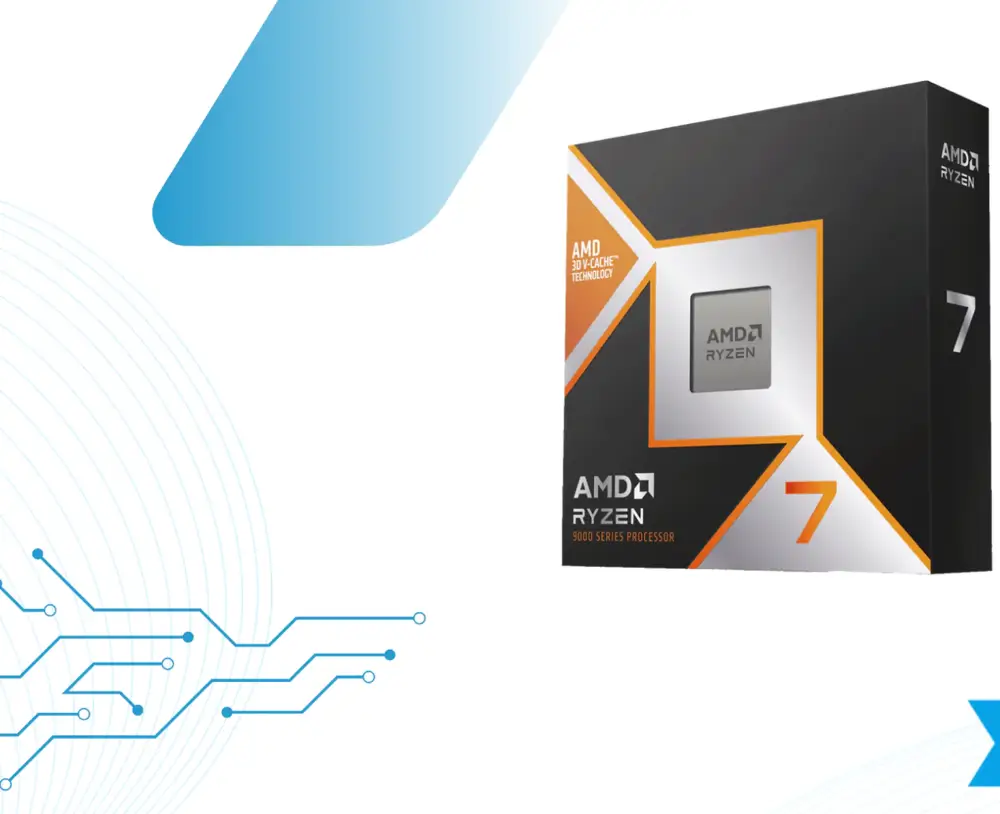
Socket: AM5 | Cores: 8 | Threads: 16 | L2 Cache: 8 MB | L3 Cache: 96 MB | Base Clock: 4.7 GHz | Boost Clock: Up to 5.2 GHz | TDP: 120W | Unlocked: Yes | MSRP: $479
Pros
- AVX-512 support is present
- An absolute beast in gaming
- Allows overclocking
- Decent performance to TDP ratio
- 3D V-Cache technology
- Improved productivity performance
Cons
- Performance is hard to differentiate at 4K
The Ryzen 7 9800X3D has taken the lead as AMD’s new gaming powerhouse, beating the popular Ryzen 7 7800X3D in many gaming benchmarks. Thanks to its upgraded 3D V‑Cache and Zen 5 architecture, it delivers faster performance in both gaming and productivity tasks while using power more efficiently than the previous model. It also supports overclocking, allowing you to squeeze out even more performance if needed. Altogether, this makes the 9800X3D a strong pick for gamers or anyone who wants a CPU that handles both gaming and heavy workloads with ease.
Buy It If
If you want an all‑round strong processor: The Ryzen 7 9800X3D is a great choice if you need powerful performance in both gaming and productivity. It handles games smoothly while also delivering impressive results in demanding workloads, giving you a balanced “best of both worlds” experience.
If you want an energy‑efficient processor: If you prefer a processor that’s powerful without using too much electricity, the Ryzen 7 9800X3D is an excellent pick. It runs cool and eff.iciently, making it ideal for users who want top performance without high energy
Don’t Buy It If
If you’re using a high‑resolution display: When you switch to a higher resolution like 2160p, the performance gap between CPUs becomes much smaller because the load shifts more to the GPU. In this case, the Ryzen 7 9800X3D doesn’t offer a big advantage over cheaper alternatives, making it less cost‑effective for high‑resolution gaming.
Intel Core Ultra 9 285K
Best Intel CPU for Video Editing
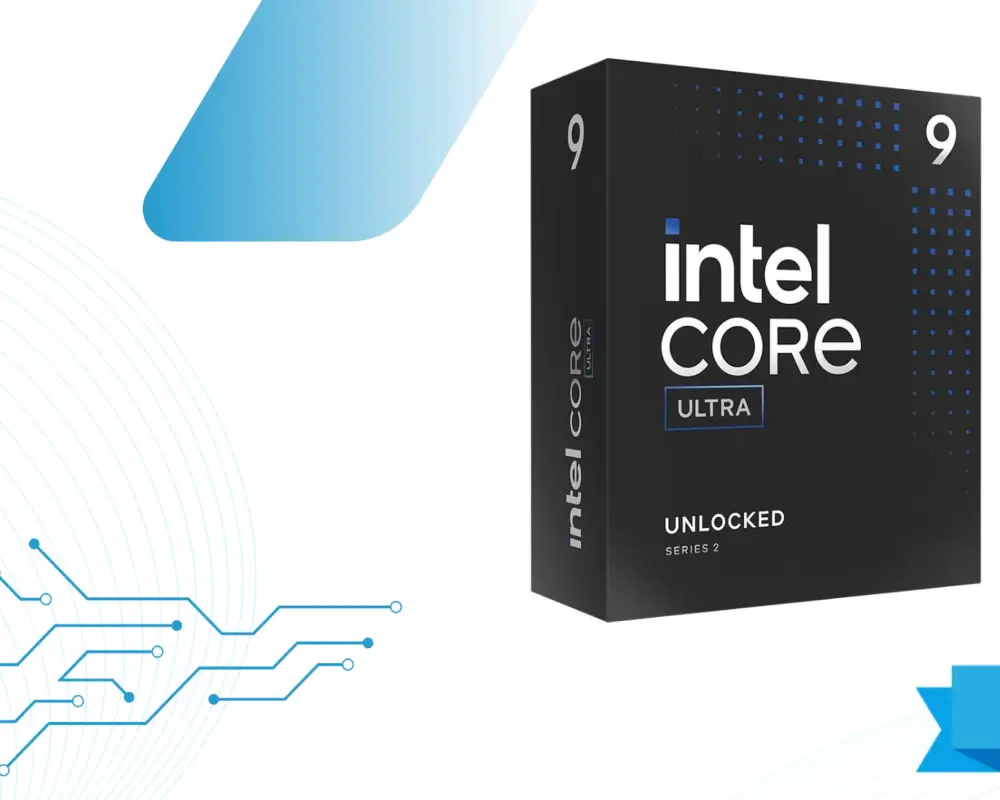
Socket: LGA-1851 | Cores: 24 (8P + 16E) | Threads: 24 | L2 Cache: 40 MB | L3 Cache: 36 MB | Base Clock: 3.2 GHz | Boost Clock: Up to 5.7 GHz | TDP: 125W | Unlocked: Yes | MSRP: $590
Pros
- Multicore performance is top-of-the-line
- Superior efficiency
- Productivity applications run well
- The platform won’t die quickly
- High-speed memory is supported
Cons
- Not a great generation uplift in gaming performance
The Core Ultra 9 285K is a strong option if you care about fast rendering and smooth multitasking, as it performs very well in many benchmark tests. Thanks to its move to TSMC’s 3nm process, it also stays relatively calm and efficient under load. Overall, it’s a solid pick for creators and power users who want high performance without extreme heat or power draw.
Buy It If
If you want a productivity‑focused processor: The Intel Core Ultra 9 285K is an excellent pick for productivity work. Its high core count handles demanding tasks smoothly, making it great for creators, editors, and professionals who need strong multi‑core performance.
If you want a strong power‑to‑efficiency balance: The Intel Core Ultra 9 285K delivers impressive performance while staying efficient. It uses noticeably less power than many high‑end CPUs, making it a wise choice for users who want speed without high energy consumption.
Don’t Buy It If
If you need strong single‑core performance:
The Intel Core Ultra 9 285K is not the best choice here. Its single‑core performance isn’t a big step up, so in gaming it doesn’t clearly beat the Core i9‑14900K and offers only a small improvement, if any.
AMD Ryzen 7 9700X
Best Budget CPU for Video Editing
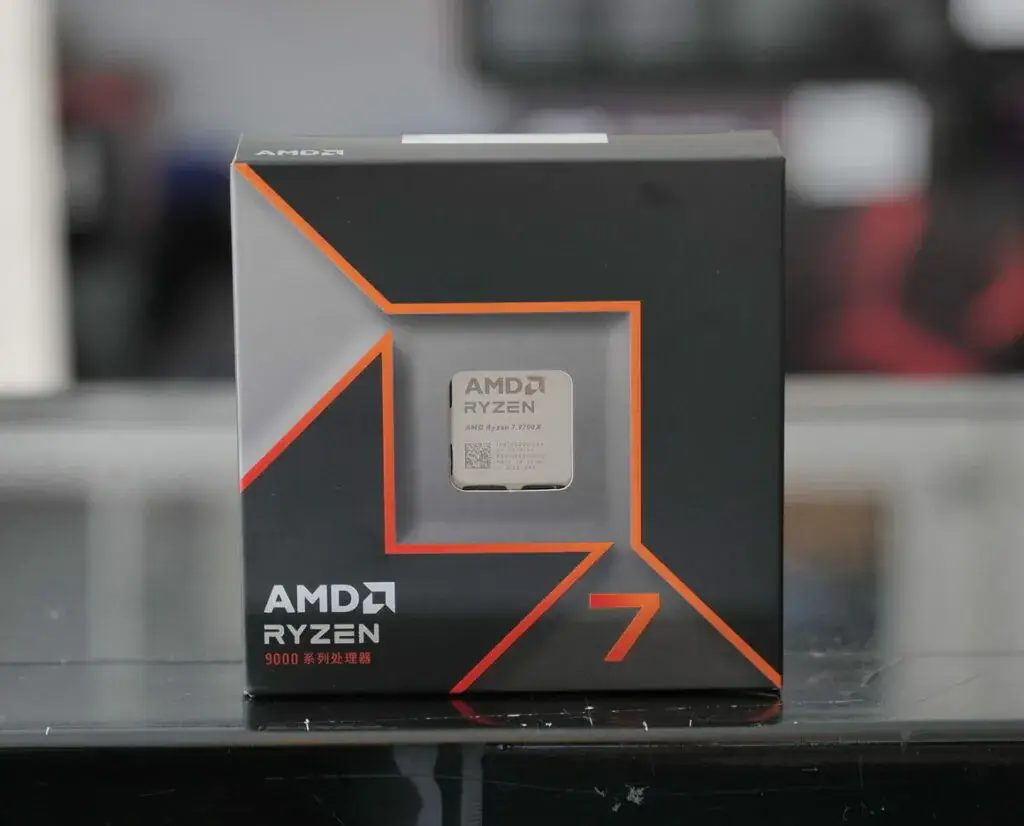
Socket: AMD AM5 | Cores: 8 | Threads: 16 | L2 Cache: 8 MB | L3 Cache: 32 MB | Base Clock: 3.8 GHz | Boost Clock: Up to 5.5 GHz | TDP: 65W | Unlocked: Yes | MSRP: $329
Pros
- Good single-threaded performance
- AVX-512 is here
- OC is supported
- $40 cheaper than predecessor
- Focuses on efficiency
Cons
- Multithreaded performance isn’t as strong
The Ryzen 7 9700X is an excellent choice if you want strong single‑core performance and good power efficiency, especially if your workloads rely on AVX‑512 instructions. It’s also a solid pick for users who enjoy tweaking settings, since adjusting its power limits can help you squeeze out even more performance.
Buy It If
If you want great value: The Ryzen 7 9700X delivers strong performance without a high price tag, making it an excellent value.
If you care about thermals and efficiency: This processor uses little power while still delivering excellent performance. It also runs noticeably cooler than the previous generation, which is another big plus.
Don’t Buy It If
If you need very strong multi‑core performance:
The Ryzen 7 9700X is fine for moderate multi‑core workloads, but if your tasks are extremely heavy or professional‑grade, you’ll be better off with a more powerful CPU that has a higher core count.
AMD Ryzen 9 9950X
Best CPU For 4K And 8K Video Editing

Socket: AMD AM5 | Cores: 16 | Threads: 32 | L2 Cache: 16 MB | L3 Cache: 64 MB | Base Clock: 4.3 GHz | Boost Clock: Up to 5.7 GHz | TDP: 170W | Unlocked: Yes | MSRP: $599
Pros
- Excellent single & multicore performance
- Has AVX-512 support
- Highly efficient
- Future-proof
Cons
- Expensive
AMD’s new flagship CPU delivers excellent performance, but it also costs $599, making it pricier than the Core i9‑14900K. In productivity workloads, it keeps up well with Intel’s top chip, but in 1080p gaming, it falls a bit short, and the Ryzen 7 7800X3D still holds the gaming crown. On the plus side, this new processor uses less power and runs cooler than the 14900K, so if you care more about efficiency, lower temps, and a quieter system than squeezing out every last FPS, it’s still an excellent option.
Buy It If
If you want top‑tier single‑ and multi‑core power: The Ryzen 9 9950X is a true performance monster, offering impressive speed in both single‑core tasks and heavy multi‑core workloads. It’s built for users who need strong overall performance without compromise.
If you need AVX‑512 support: For workloads that rely on AVX‑512 instructions, the Ryzen 9 9950X is an easy choice. It includes native AVX‑512 support, making it ideal for creators, engineers, and professionals who depend on this feature for maximum efficiency.
Don’t Buy It If
If you’re looking for a value‑focused processor: The Ryzen 9 9950X delivers excellent performance, but it also comes with a high price. If you’re trying to build a budget‑friendly PC or want the best performance per dollar, this probably isn’t the right CPU for you.
Best CPU for Video Editing in 2025 (Top Picks)
The best CPUs for video editing in 2025 deliver fast rendering, smooth playback, and excellent multitasking performance. Editors who work with 4K and 8K footage need high core counts, strong single‑core speed, and good efficiency. Modern CPUs from AMD and Intel now offer an excellent balance between raw power and thermal control. Whether you are a professional filmmaker or a beginner content creator, the right CPU can save hours of work every week. Below are the top picks based on performance, value, and software compatibility.
Best High‑End CPU for 4K & 8K Editing
For the highest‑level projects, the AMD Ryzen 9 9950X stands out for its strong multicore performance and excellent efficiency. It handles 4K and 8K timelines with ease, even when using heavy color grading or multiple effects. Intel’s Core Ultra 9 285K is also a strong alternative for users who prefer Intel’s ecosystem. These CPUs are built for professionals who want the fastest export times and top‑tier responsiveness.
Best Mid‑Range CPU for Smooth Editing
The Ryzen 7 9700X is one of the best mid‑range options thanks to its excellent efficiency and stable performance in 1080p and 4K editing. It handles timelines smoothly and stays cool even during long editing sessions. Intel’s Core i7‑14700K is another reliable choice, offering strong single‑core performance for better playback. These CPUs give you excellent value without jumping into high‑end pricing.
Best Budget CPU for Beginners
For new editors or those on a tight budget, the Ryzen 5 7600X delivers impressive results for the price. It can handle 1080p and basic 4K projects without significant lag. Intel’s Core i5‑14600K is also a solid option, offering a good balance between speed and cost. These CPUs are ideal for YouTube editors, students, and beginners starting their editing journey.
Best CPU for Adobe Premiere Pro
Premiere Pro benefits from strong multicore performance and high clock speeds. The Intel Core Ultra 9 285K performs exceptionally well in Adobe workflows due to its hybrid architecture and fast export speeds. The Ryzen 9 9950X is another excellent option for creators who want fast rendering and smooth timeline handling. Both CPUs offer outstanding stability for large Premiere Pro projects.
Best CPU for DaVinci Resolve
DaVinci Resolve relies heavily on both CPU and GPU power, but the CPU still plays a big part in Fusion and color grading. The Ryzen 9 9950X is a top choice for its multicore performance and consistent performance during heavy grading tasks. Intel’s Core Ultra 9 chips are also strong contenders, especially for users with GPU‑focused workflows. These processors ensure smooth playback even in complex nodes and multi‑layer projects.
Best CPU for After Effects Workloads
After Effects relies heavily on single‑core performance, making CPUs like the Ryzen 7 9800X3D and Intel Core i7‑14700K excellent choices. Their high clock speeds enable faster previews, smoother animations, and reduced lag in motion graphics. For more advanced VFX tasks, the Ryzen 9 9950X is a significant upgrade, as it handles complex compositions and multitasking with ease. These CPUs ensure a smoother AE experience from start to finish.
Comparison Table
Below is a quick comparison of the best CPUs for video editing, including their core specs, speed, price range, and ideal use cases. It helps you choose the right processor based on your editing style, budget, and performance needs.
| CPU Name | Cores / Threads | Clock Speed (Base / Boost) | Price (Approx.) | Best For |
|---|---|---|---|---|
| AMD Ryzen 9 9950X | 16C / 32T | 4.0 GHz / 5.7 GHz | $599–$650 | 4K/8K editing, heavy workloads, pro creators |
| AMD Ryzen 7 9800X3D | 8C / 16T | 4.7 GHz / 5.7 GHz | $449–$499 | Gaming + editing combo, timeline smoothness |
| Intel Core Ultra 9 285K | 24C / 24T (8P + 16E) | 3.8 GHz / 5.6 GHz | $569–$620 | Rendering, multitasking, productivity |
| AMD Ryzen 7 9700X | 8C / 16T | 3.8 GHz / 5.5 GHz | $349–$399 | Power‑efficient editing, long sessions |
| Intel Core i9‑14900K | 24C / 32T | 3.2 GHz / 6.0 GHz | $530–$580 | High‑FPS editing + gaming, hybrid users |
| AMD Ryzen 5 7600X | 6C / 12T | 4.7 GHz / 5.3 GHz | $229–$249 | Budget 1080p/1440p editing, beginners |
| Intel Core i5‑14600K | 14C / 20T | 3.5 GHz / 5.3 GHz | $289–$329 | Mid‑range video editing, content creators |
Benchmarks of The Best CPU For Video Editing
When testing the best CPUs for video editing, reviewers look at timeline smoothness, playback stability, export speed, and how well the processor handles heavy effects. In most benchmark results, high‑core CPUs like the Ryzen 9 9950X and Intel Core Ultra 9 285K stay on top because they can handle more tasks simultaneously. It gives them a clear lead in 4K and 8K exports, color grading, and multi‑layer editing.
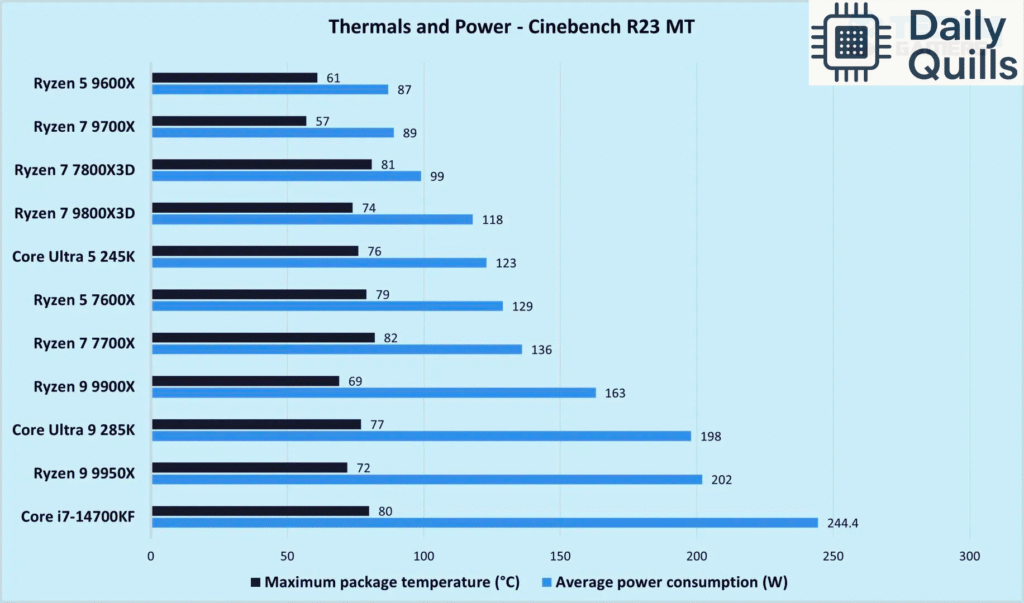
Mid‑range chips such as the Ryzen 7 9700X and Core i7‑14700K also deliver strong performance in popular editing software such as Adobe Premiere Pro and DaVinci Resolve. They provide smooth playback and fast renders for 1080p and 4K projects while keeping power use under control. These processors offer a good balance of speed and affordability for most creators.
CPUs like the Ryzen 7 9800X3D stand out for their timeline responsiveness thanks to their large cache, which helps with faster previews and reduced stutter. However, export performance is usually stronger on CPUs with higher core counts. Budget‑friendly options, such as the Core i5‑14600K or Ryzen 5 7600X, still deliver good results for lighter workloads and shorter videos.
Overall, benchmark data makes one thing clear:
- More cores = faster exports
- Higher clock speed & cache = smoother playback
This combination helps you choose the right CPU based on whether you prioritize real‑time editing or fast rendering. If you want, I can also create a benchmark table, graphs, or software‑specific benchmark breakdowns.
Intel vs AMD – Which CPU Brand is Better for Editing?
When it comes to video editing, choosing the right CPU can determine how smooth your timeline feels, how fast your videos render, and how efficiently your system handles effects. Both Intel and AMD offer powerful processors—but each has its own strengths.
Performance Difference in Real Editing Work
In real-world editing tests using software like Adobe Premiere Pro, DaVinci Resolve, and After Effects:
- Intel CPUs often lead in single-core performance, which helps with timeline scrubbing, filters, and effects.
- AMD Ryzen CPUs, especially the Ryzen 9 and Threadripper series, dominate multi-core tasks such as rendering and exporting.
For editors who prioritize playback smoothness, Intel may feel snappier.
For editors who want the fastest exports, AMD usually wins due to more cores at a better price.
Power Usage and Heat Output
- AMD Ryzen processors are more power-efficient and run cooler, making them ideal for long editing sessions.
- Intel’s high-end chips can draw more power, producing more heat, especially under heavy rendering loads.
If you’re building a compact or silent workstation, AMD is generally the better choice.
Long-Term Reliability and Upgrade Options
- AMD’s AM4/AM5 platforms typically support multiple CPU generations, making upgrades easier.
- Intel motherboards often support only 1–2 generations before requiring a new board.
For long-term PC building flexibility, AMD offers better upgrade potential.
How Many Cores Do You Really Need for Video Editing?
Core count matters—but not all workflows benefit equally. Video editing uses a mix of single-core performance (timeline playback) and multi-core power (rendering/exporting).
Best Core Count for 1080p Editing
- 6–8 cores (e.g., Ryzen 5, Intel i5/i7)
- Smooth timeline performance
- Fast renders for short-form content
Ideal for beginners and YouTube creators.
Best Core Count for 4K Editing
- 8–12 cores (Ryzen 7/9, Intel i7/i9)
- Handles heavier effects, color correction, and multi-layer timelines
- Shorter export times
Recommended for prosumers and small studios.
Best Core Count for 8K Editing
- 16+ cores (Ryzen 9, Threadripper, Intel i9 or Xeon)
- Required for RAW footage, heavy color grading, and VFX
- Works well with high-end GPUs
A must for filmmaking and commercial production companies.
Common Problems Caused by Weak CPUs
A weak or outdated CPU can become a severe bottleneck in video editing. Here are the most common issues creators experience:
Timeline Lag and Slow Playback
When your CPU can’t keep up, you’ll see:
- dropped frames
- delayed timeline movements
- slow reaction when adding color or effects
Long Rendering and Export Times
Weak CPUs force your system to take 2–3x longer to render videos, mainly when exporting to 4K or adding motion graphics.
Choppy Effect Previews
CPU-heavy tasks like motion blur, stabilization, and masking can stutter badly on low-core processors.
Software Crashes with Heavy Projects
Large timelines with many layers stress the CPU.
A weak processor increases the chance of:
- program freezes
- cache overload
- crash during render
How to Choose the Right CPU for Your Editing Style
Your editing style and workload should determine your CPU—not the other way around.
For YouTube Editors
- 1080p/4K footage
- Moderate color correction
- Light motion graphics
Best choice:
8–10 core CPUs (Ryzen 7 / Intel i7)
For Short-Form Content (Reels/TikTok)
- Fast edits
- Mobile-first formats
- Lower resolution
Best choice:
6–8 cores (Ryzen 5 / Intel i5)
For Filmmakers & Colorists
- Multi-camera timelines
- RAW/LOG footage
- Heavy grading
Best choice:
12–16+ cores (Ryzen 9 / Intel i9)
For Motion Graphics & VFX Artists
- After Effects heavy use
- Compositing
- 3D elements
Best choice:
High clock speed + more cores
12–24 core CPUs recommended
Best CPU + GPU Combination for Editing
To get the best editing performance, both CPU and GPU need to be balanced.
When GPU Matters More Than CPU
The GPU handles:
- playback acceleration
- color grading
- noise reduction
- effects
- encoding/decoding (NVENC/QuickSync)
DaVinci Resolve relies heavily on GPU, so pairing a strong graphics card with your CPU is crucial.
Balanced PC Build Recommendations
Here are optimized builds for different budgets:
Budget Editing Build
- CPU: Ryzen 5 / Intel i5
- GPU: RTX 3050 / RX 6600
- RAM: 16–32GB
- Best for: 1080p editing, YouTube
Mid-Range Editing Build
- CPU: Ryzen 7 / Intel i7
- GPU: RTX 3060–4070
- RAM: 32GB
- Best for: 4K editing, color grading
High-End Professional Build
- CPU: Ryzen 9 / Intel i9
- GPU: RTX 4080–4090
- RAM: 64–128GB
- Best for: 8K, filmmaking, VFX, commercial work
Final Thoughts
Choosing the right CPU for video editing depends on your workflow:
- Intel = best timeline responsiveness
- AMD = best multi-core value and upgrade path
- More cores = faster exports
- Strong GPU = smoother previews and color grading
By understanding your needs and balancing your CPU + GPU, you can build a system that delivers professional-level performance and long-term reliability.
What kind of CPU do I need for video editing?
At least 10 cores, high clock speeds, and multi-threading support for smooth editing and fast renders.
What works more in video editing — CPU or GPU?
Mostly the CPU, since it handles decoding, processing, and rendering. GPU helps with effects and color grading.
What is the minimum acceptable CPU for video editing?
The Intel i5-13600K is a strong minimum for professional 1080p/4K editing.
Is a 6-core CPU enough for video editing?
For basic 1080p, yes. For 4K and heavy projects, prefer eight cores or more.
Does clock speed matter more than core count?
Clock speed = smoother playback
Core count = faster rendering
Best CPU = a balance of both.
Do I need a high-end CPU if I have a powerful GPU?
Yes, A weak CPU will bottleneck your GPU, even if it’s high-end.