Can I Use Higher Frequency RAM Than CPU? Complete Overview

Can I Use Higher Frequency RAM Than CPU? It is a common question for anyone trying to improve computer performance. The short answer is yes, you can, but the results may not always match your expectations. Your CPU and RAM must work smoothly together, and this depends on factors like speed, voltage, and memory timings.
If you install RAM that runs faster than your CPU supports, your system will automatically downclock the RAM to match the CPU’s highest safe speed. This keeps your PC stable, but it also means you won’t get the full benefit of that higher-frequency RAM.
For the best performance and long-term stability, it’s smarter to choose RAM that matches your CPU’s supported specifications. This helps prevent wasted performance and unnecessary slowdowns, ensuring your system runs efficiently.
It’s always a good idea to use RAM that matches the frequency supported by your CPU. Installing RAM with a higher frequency than what your processor can handle usually won’t deliver noticeable performance gains. In some cases, it can even lead to instability or system crashes.

For the best performance and smooth operation, make sure the RAM you choose falls within your CPU’s supported frequency range. You can verify this by checking your processor’s specifications or by consulting the manufacturer’s guidelines.
Understanding the Relationship Between CPU and RAM Frequency
When you build or upgrade a computer, it’s essential to understand how the CPU and RAM work together. Both parts directly affect how fast and smoothly your computer performs. One common question many users ask is: “Can I use higher frequency RAM than my CPU?”
Let’s break this down in simple words and see what happens when RAM speed is higher than what the CPU typically supports.
What RAM and CPU Frequencies Mean
To understand compatibility, you must first know how RAM and the CPU work:
RAM Frequency
RAM is a fast temporary memory that stores data your CPU needs right now.
Its speed (measured in MHz or GHz) tells you how quickly it can send or receive data.
CPU Frequency
The CPU is the main chip that does all calculations and runs programs.
Its clock speed (measured in GHz) indicates how many operations it can perform per second.
Modern CPUs also include a memory controller, which determines the speed at which RAM operates.
With these basics covered, we can now answer the main question.
Can You Use Higher Frequency RAM Than the CPU?
Yes, you can — but with some conditions.
Higher-frequency RAM will still work, but it will only run at the maximum speed your CPU and motherboard can support. So, while the RAM might be rated at a higher speed, your system may downclock it automatically to match supported speeds.
Compatibility Is Key
Before using high-speed RAM, you must check:
- Motherboard’s supported RAM frequencies
- CPU’s supported RAM types and speeds
This information is always listed in the motherboard manual or product page.
Using XMP for Higher Speeds
If your motherboard and CPU allow higher frequencies, you can enable XMP (Extreme Memory Profile) in the BIOS.
XMP tells the system to run your RAM at its proper rated speed instead of the default lower speed.
However, remember:
- XMP is a form of mild overclocking
- It can increase heat
- Stability may vary based on hardware quality
Good cooling and proper testing are recommended.
Do Higher RAM Speeds Improve Performance?
It depends.
Faster RAM can help in:
- Gaming
- Video editing
- 3D rendering
- Running heavy applications
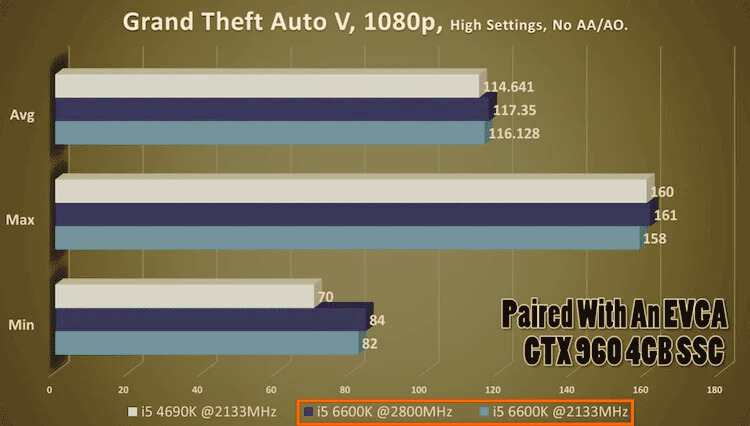
But for everyday tasks like browsing, watching videos, or office work, the difference is usually slight because the CPU speed becomes the limiting factor.
The Good News
Using higher-frequency RAM will not damage your system.
Your PC automatically adjusts speed to stay stable.
Tips for Best Performance
To get the most out of your RAM:
- Check compatibility — motherboard, CPU, and RAM should match.
- Enable XMP — Only if all parts support higher speeds.
- Watch CPU limits — A very slow CPU won’t benefit much from fast RAM.
- Monitor temperatures — Overclocking increases heat.
- Test stability — Use tools like MemTest to ensure everything runs smoothly.
Summary
You can use RAM with a higher frequency than your CPU supports. The system will run safely, but the RAM will only work at speeds supported by your CPU and motherboard. If your hardware supports it, enabling XMP can help you use the full RAM speed. Just remember to check compatibility, keep your system cool, and test stability after changes.
Whether higher-frequency RAM is worth it depends on your tasks — it helps in demanding applications but may not make a huge difference in everyday use.
Compatibility Between RAM Frequency and CPU
You can use RAM at a higher frequency than your CPU officially supports, but understanding compatibility is essential for stable, smooth performance.
When you install faster RAM, your computer will not run it at full speed unless the CPU and motherboard allow it. Instead, the system automatically downclocks the RAM to the highest speed your CPU can handle. For example, if your CPU supports up to 3200MHz but you install 3600MHz RAM, it will still run at 3200MHz.
Faster RAM can still help with multitasking and data-heavy work, but you must check your motherboard specifications and the CPU’s memory controller. These parts decide the maximum RAM frequency your system can support.
Also, make sure the RAM voltage matches the motherboard’s requirements. Higher-frequency RAM sometimes requires extra voltage, and if your motherboard cannot handle it, you may experience stability issues.
Key Takeaways
- Using RAM faster than the CPU supports won’t increase speed; it may even reduce overall system efficiency.
- For best performance, choose RAM that matches the CPU’s maximum supported frequency.
- If you install higher-frequency RAM, it will automatically run at the speed your CPU can handle, not its full rated speed.
- Using RAM that is slower than the CPU’s supported speed means you lose the potential performance your system could have delivered.
- Always check the official specifications from the CPU and RAM manufacturers before buying memory for your system.
Frequently Asked Questions
Can I use RAM with a higher frequency than my CPU?
Yes, you can. But the RAM will not run at its full speed. It will automatically match the highest supported frequency of your CPU.
For example, if your CPU supports 3200MHz, and you install 3600MHz RAM, it will still run at 3200MHz.
Keep in mind: using higher frequency RAM will not give extra performance unless the CPU can handle it.
What happens if I use RAM that is slower than my CPU supports?
Slower RAM will still work fine, but it will run at its own lower speed.
It means your CPU won’t reach its full memory performance potential.
However, the real-world difference in RAM speeds is usually slight, especially for everyday tasks like browsing, watching videos, or office work.
How do I check the maximum RAM frequency my CPU supports?
You can find this information on your CPU manufacturer’s website or in the product manual.
If that feels difficult, you can use free tools like CPU-Z, Speccy, or similar programs. They show your CPU details, including supported RAM speeds.
Does higher frequency RAM need any special settings?
In most cases, no special setup is needed. Your system will automatically adjust the RAM to a supported speed.
However, some motherboards may need a BIOS update to support higher-frequency RAM correctly.
It’s a good idea to check your motherboard manufacturer’s website for updates or compatibility notes.
Are there any risks with using higher frequency RAM?
Using higher frequency RAM itself is safe.
Problems only arise if you manually overclock the RAM without proper knowledge. Incorrect overclocking can cause system instability or crashes.
If you’re not comfortable with advanced settings, it’s best to keep the default configuration or ask a professional for help.
Although you can install RAM that has a higher frequency than what your CPU supports, it usually won’t give you much extra performance. Your system always runs at the speed of its slowest supported component, so the faster RAM matches the CPU’s maximum allowed frequency.
Still, higher frequency RAM can offer a few small benefits. It can be helpful for future upgrades if you plan to switch to a CPU that supports higher speeds. It also provides slightly lower latency, making your system feel more responsive and helping with multitasking in certain situations.